
# Skybox Exports
Auth: Getting started · Security.
Export a completed skybox to other file types and resolutions.
Video Preview (portrait, landscape, square) exports a short clip of an existing skybox for sharing or review. It is not generative video. It is available on Model 3 and Model 4. GLB (3D mesh) is available on Model 3.
# Export types by model
| Export type | Model 3 | Model 4 | Notes |
|---|---|---|---|
| JPG / PNG (equirectangular) | Yes | Yes | |
| HDRI (HDR, EXR) | Yes | Yes | Improved 32-bit pipeline (coming next). See HDRI |
| Depth Map | Yes | Yes | |
| Cube Map | Yes | Yes | |
| Video Preview (portrait, landscape, square) | Yes | Yes | Short clip of an existing skybox, not generative video |
| GLB (3D mesh) | Yes | No | Experimental 3D mesh |
Live catalog: Get Export Types.
# Resolutions by model
| Resolution | Model 3 | Model 4 |
|---|---|---|
| 1K | Yes | Yes |
| 2K | Yes | Yes |
| 4K | Yes | Yes (default) |
| 8K | Yes (default) | No |
| 16K | Yes | No |
Depth maps use 2K only. GLB uses mesh quality instead of resolution. Live catalog: Get Export Resolutions.
# HDRI (HDR, EXR)
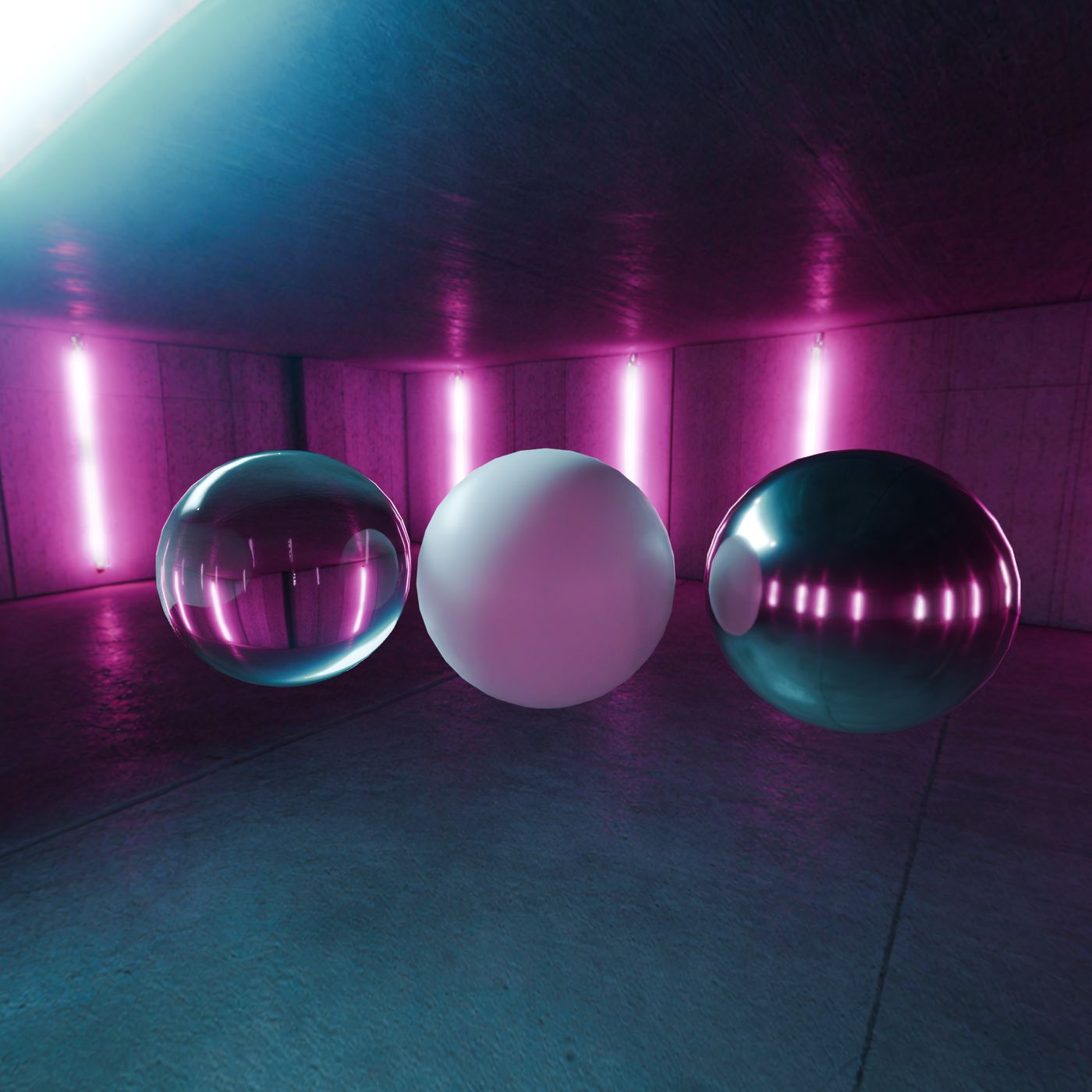
32-bit HDRI exports (.hdr and .exr) turn a completed equirectangular skybox into an environment map for image-based lighting in engines and DCC tools. The same map lights a glass sphere, a diffuse sphere, and a chrome sphere differently.
# Improved pipeline
Coming next
Beta 1.14.11 replaces the previous AI exposure-bracketing HDRI path with a computer-vision converter. Until that ships, existing hdri-hdr / hdri-exr exports continue to work as today.
What changes for you:
- Faster exports. HDRI jobs typically finish in seconds, not the multi-minute waits of the old bracketing path. Exact production timing still depends on resolution and queue load; we will publish measured ranges when QA numbers are locked (Roadmap).
- Better dynamic range. Emitters (sun, lamps, windows, and similar hot spots) get recoverable intensity so lookdev and exposure adjustments behave more like a real HDRI, instead of clipped “burned” highlights.
- Same API types. Keep requesting
hdri-hdrandhdri-exr. No new export type keys.
In the web app, HDRI options appear under NEW 32-BIT HDRI in the Download window. Progress and finished files also show in Export Status.
# Scene-aware conversion modes
The converter uses content-aware presets so lighting reconstruction matches the skybox. Names, keys, and ids are the Get Export HDRI modes list. Realism (id 2) is the default.
| Mode | Key | ID | Best for |
|---|---|---|---|
| Artistic | artistic | 1 | Stylized outdoor worlds, multi-sun skies, auroras, fantasy lighting |
| Realism | realism | 2 | Photoreal outdoor scenes with one dominant sun or key light |
| Studio | studio | 3 | Studios, product and vehicle stages |
| Interior | interior | 4 | Rooms without a sky dome |
| Space | space | 5 | Starfields and nebulae with no horizon |
Mode selection is a content choice, not a quality slider. On Request Export, send hdri_mode_id for hdri-hdr or hdri-exr. If you omit it, the export uses Realism.
Plan availability: HDRI exports are a paid / higher-tier feature. See Pricing and limits.
# Image metadata
Equirectangular downloads include Photo Sphere (GPano) camera metadata.
Skybox image downloads do not currently include:
- IPTC AI provenance labels
- C2PA Content Credentials
# Coming next: IPTC labels
We plan to add standard IPTC / XMP fields on still exports (such as equirect JPG and PNG) so a file can show that it was made with Skybox AI. Planned fields:
| Field | Value |
|---|---|
| Digital Source Type | AI-generated (trainedAlgorithmicMedia) |
| Creator / Credit | Blockade Labs |
| AI System Used | Skybox AI (and model when available) |
| AI Prompt Writer Name | Your user ID |
| AI Prompt Information | Generation ID |
We will not embed the raw prompt text. Signed C2PA Content Credentials may come later.
Use the generation ID from the API response for your own records. IPTC labels and C2PA Content Credentials are still to come. Status: Roadmap.
# Get Export Types
Returns the list of all available export types.
# Method
GET
# API Endpoint
https:/api/v1/skybox/export
# Response example
[
    {
        "id": 1,
        "name": "JPG",
        "key": "equirectangular-jpg",
    },
    {
        "id": 2,
        "name": "PNG",
        "key": "equirectangular-png",
    },
     {
        "id": 3,
        "name": "Cube Map - Roblox",
        "key": "cube-map-roblox-png"
    },
    {
        "id": 4,
        "name": "HDRI HDR",
        "key": "hdri-hdr",
    },
    {
        "id": 5,
        "name": "HDRI EXR",
        "key": "hdri-exr",
    },
    {
        "id": 6,
        "name": "Depth Map",
        "key": "depth-map-png",
    },
    {
        "id": 7,
        "name": "Video Preview Landscape",
        "key": "video-landscape-mp4",
    },
    {
        "id": 8,
        "name": "Video Preview Portrait",
        "key": "video-portrait-mp4",
    },
    {
        "id": 9,
        "name": "Video Preview Square",
        "key": "video-square-mp4",
    },
    {
        "id": 10,
        "name": "Cube Map - Default",
        "key": "cube-map-default-png"
    },
    {
        "id": 11,
        "name": "GLB", // not available for model 4
        "key": "3d-mesh-glb"
    }
]
# Get Export Resolutions
Returns the list of all available export resolutions. Defaults and Model 4 limits: Resolutions by model.
# Method
GET
# API Endpoint
https:/api/v1/skybox/export/resolutions
# Response example
[
    {
        "id": 1,
        "name": "1K",
        "width": 1024,
        "height": 512
    },
    {
        "id": 2,
        "name": "2K",
        "width": 2048,
        "height": 1024
    },
    {
        "id": 3,
        "name": "4K", // Default for model 4
        "width": 4096,
        "height": 2048
    },
    {
        "id": 4,
        "name": "8K", // Default for model 3
        "width": 8192,
        "height": 4096
    },
    {
        "id": 7,
        "name": "16K",
        "width": 16384,
        "height": 8192
    }
]
# Get Export 3D mesh qualities
Returns a list of available 3D mesh qualities. Medium being the default.
3D mesh qualities are only used for GLB exports types and are set instead of resolutions.
Any resolution settings are ignored for GLB export types.
# Method
GET
# API Endpoint
https:/api/v1/skybox/export/mesh-qualities
# Response example
[
    {
        "id": 1,
        "name": "Low",
        "key": "low"
    },
    {
        "id": 2,
        "name": "Medium",
        "key": "medium"
    },
    {
        "id": 3,
        "name": "High",
        "key": "high"
    },
    {
        "id": 4,
        "name": "Epic",
        "key": "epic"
    }
]
# Get Export HDRI modes
Returns a list of available HDRI export modes. Realism (ID: 2) is the default.
HDRI modes are used for hdri-hdr and hdri-exr export types and can be combined with a resolution.
# Method
GET
# API Endpoint
https:/api/v1/skybox/export/hdri-modes
# Response example
[
    {
        "id": 1,
        "name": "Artistic",
        "key": "artistic"
    },
    {
        "id": 2,
        "name": "Realism",
        "key": "realism"
    },
    {
        "id": 3,
        "name": "Studio",
        "key": "studio"
    },
    {
        "id": 4,
        "name": "Interior",
        "key": "interior"
    },
    {
        "id": 5,
        "name": "Space",
        "key": "space"
    }
]
# Get Export History
Returns a list of export requests for the authenticated user.
# Method
GET
# API Endpoint
https:/api/v1/skybox/export/history
| Key | Data Type | Description | |
|---|---|---|---|
| limit | Integer | Number of items per page. Default: 18, max: 100 | optional |
| offset | Integer | Number of records to skip (page index × limit). Default: 0 | optional |
| order | String | Sort order: ASC or DESC. Default: DESC | optional |
| status | String | Filter by status: pending, dispatched, processing, complete, abort, error | optional |
| export_id | Integer | Filter by export ID | optional |
| api_key_id | Integer | Filter by API key ID | optional |
| type_id | Integer | Filter by export type ID. Check out the available types here. | optional |
| resolution_id | Integer | Filter by export resolution ID. Check out the available resolutions here. | optional |
| mesh_quality_id | Integer | Filter by 3D mesh quality ID. Check out the available qualities here. | optional |
| hdri_mode_id | Integer | Filter by HDRI mode ID. Check out the available modes here. | optional |
# Response example
{
    "data": [
        {
            "file_url": "https://blockade-platform-production.s3.amazonaws.com/exports/equirectangular-png/example.png", // url for the exported file
            "id": "b26584eb869cdebeecdf009b7c17c73b", // id of your export request. It can be used to track progress or cancel the request
            "skybox_id": 65, // skybox id
            "skybox_obfuscated_id": "08ccb4947d546dec0ce454538ebb51a8", // skybox obfuscated id
            "skybox_title": "World #65", // skybox title
            "type": "equirectangular-png", // export type key
            "type_id": 2, // export type id
            "resolution": "4K", // export resolution name
            "resolution_id": 3, // export resolution id
            "mesh_quality": null, // 3d mesh quality key (null for non-3d exports)
            "mesh_quality_id": null, // 3d mesh quality id (null for non-3d exports)
            "hdri_mode": null, // hdri mode key (null for non-hdri exports)
            "hdri_mode_id": null, // hdri mode id (null for non-hdri exports)
            "depth_scale": null, // depth scale value (null for non-3d exports)
            "status": "complete", // pending, dispatched, processing, complete, abort, error
            "queue_position": 0, // position in export generation queue
            "error_message": null, // error message if status=error
            "pusher_channel": "export_status_update_b26584eb869cdebeecdf009b7c17c73b", // pusher channel to track progress
            "pusher_event": "status_update", // pusher event name
            "webhook_url": null, // webhook url for progress updates
            "created_at": "2023-08-23T13:52:59.000000Z"
        }
    ],
    "totalCount": 1, // total number of matching records
    "has_more": false // whether there are more records beyond the current page
}
# Request Export
# Method
POST
# API Endpoint
https:/api/v1/skybox/export
| Key | Data Type | Description | |
|---|---|---|---|
| skybox_id | String | Skybox obfuscated_id (needs to have status=complete) | required |
| type_id | Integer | Export type id. Check out the available types here. | required |
| resolution_id | Integer | Export resolution id. It will default to 2K for depth maps (currently the only available resolution for depth maps is 2K), to 4K for Model 4 (Model 4 also supports 1K and 2K; 8K/16K are not available), and to 8K for all other export types (Model 3). Check out the available resolutions here. | optional |
| mesh_quality_id | Integer | Export 3D mesh quality id. If not sent it will default to medium. When using this param resolution_id is ignored. Used only for GLB export types. Check out the available mesh qualities here. | optional |
| hdri_mode_id | Integer | Export HDRI mode id. If not sent it will default to realism (ID: 2). Used only for hdri-hdr and hdri-exr export types. Check out the available modes here. | optional |
| depth_scale | Float | Export 3D mesh depth_scale. Increase the "scale" to exaggerate the overall depth, decrease the "scale" to reduce the effect (or flatten the mesh). If not sent it will default to 3.0. Should be a float between 3.0 and 10.0 and used only for GLB export types. | optional |
| webhook_url | String | Optionally, you may specify a webhook url to specify the destination for progress updates | optional |
# Response example (pending)
{
    "id": "677accb7f10fc8845e384b9747774666", // id of your export request. It can be used to track progress or cancel the request
    "skybox_obfuscated_id": "08ccb4947d546dec0ce454538ebb51a8", // skybox obfuscated id
    "type": "video-portrait-mp4", // requested export type
    "type_id": 8, // requested export type id
    "resolution": "2K", // requested export resolution
    "resolution_id": 2, // requested export resolution id
    "mesh_quality": "medium", // requested export 3d mesh quality
    "mesh_quality_id": 2, // requested export 3d mesh quality id
    "hdri_mode": null, // requested hdri mode key (null for non-hdri exports)
    "hdri_mode_id": null, // requested hdri mode id (null for non-hdri exports)
    "depth_scale": 3, // requested export 3d mesh depth scale
    "status": "pending", // initially status is set as 'pending' after you send the export request. Status will change from one state to another and you will get updates for each one if you are using pusher or webhook: pending -> dispatched -> processing -> complete. Also you can get abort or error and in some cases (ie. for JPG and Depth Map export) this will be immediately set to 'complete'.
    "queue_position": 2, // position of your request in a export generation queue
    "error_message": null, // if status=error here you should see the error message
    "pusher_channel": "export_status_update_677accb7f10fc8845e384b9747774666", // pusher channel name used to track export generation progress
    "pusher_event": "status_update", // pusher channel event used to track generation
    "created_at": "2023-08-21T09:51:18.000000Z"
}
Process for tracking export progress is the same as for generations (Pusher, webhook, or polling). See Wait for completion.
If the export request has already been completed you will immediately get a response with status=complete and file_url in the response.
# Response example (complete)
{
    "file_url": "https://blockade-platform-production.s3.amazonaws.com/depths/imagine/vr360-stunning-beautiful-vibrant-digital-painting-sega-atari_8414305.jpg", // url for the exported file
    "id": "15e8a0ae53d39e2ef518b2c02f9c43ee", // id of your export request. It can be used to track progress or cancel the request
    "skybox_obfuscated_id": "08ccb4947d546dec0ce454538ebb51a8", // skybox obfuscated id
    "type": "depth-map-png", // requested export type
    "type_id": 6, // requested export type id
    "resolution": "2K", // requested export resolution
    "resolution_id": 2, // requested export resolution id
    "mesh_quality": "medium", // requested export 3d mesh quality
    "mesh_quality_id": 2, // requested export 3d mesh quality id
    "hdri_mode": null, // requested hdri mode key (null for non-hdri exports)
    "hdri_mode_id": null, // requested hdri mode id (null for non-hdri exports)
    "depth_scale": 3, // requested export 3d mesh depth scale
    "status": "complete", // initially status is set as 'pending' after you send the export request. Status will change from one state to another and you will get updates for each one if you are using pusher or webhook: pending -> dispatched -> processing -> complete. Also you can get abort or error and in some cases (ie. for JPG and Depth Map export) this will be immediately set to 'complete'.
    "queue_position": 0, // position of your request in a export generation queue
    "error_message": null, // if status=error here you should see the error message
    "pusher_channel": "export_status_update_15e8a0ae53d39e2ef518b2c02f9c43ee", // pusher channel name used to track export generation progress
    "pusher_event": "status_update", // pusher channel event used to track generation
    "created_at": "2023-08-21T09:55:28.000000Z"
}
# Get export request
# Method
GET
# API Endpoint
https:/api/v1/skybox/export/{export.id}
# Response
{
    "file_url": "https://blockade-platform-production.s3.amazonaws.com/depths/imagine/vr360-stunning-beautiful-vibrant-digital-painting-sega-atari_8414305.jpg", // url for the exported file
    "id": "15e8a0ae53d39e2ef518b2c02f9c43ee", // id of your export request. It can be used to track progress or cancel the request
    "skybox_obfuscated_id": "08ccb4947d546dec0ce454538ebb51a8", // skybox obfuscated id
    "type": "depth-map-png", // requested export type
    "type_id": 6, // requested export type id
    "resolution": "2K", // requested export resolution
    "resolution_id": 2, // requested export resolution id
    "mesh_quality": "medium", // requested export 3d mesh quality
    "mesh_quality_id": 2, // requested export 3d mesh quality id
    "hdri_mode": null, // requested hdri mode key (null for non-hdri exports)
    "hdri_mode_id": null, // requested hdri mode id (null for non-hdri exports)
    "depth_scale": 3, // requested export 3d mesh depth scale
    "status": "complete", // initially status is set as 'pending' after you send the export request. Status will change from one state to another and you will get updates for each one if you are using pusher or webhook: pending -> dispatched -> processing -> complete. Also you can get abort or error and in some cases (ie. for JPG and Depth Map export) this will be immediately set to 'complete'.
    "queue_position": 0, // position of your request in a export generation queue
    "error_message": null, // if status=error here you should see the error message
    "pusher_channel": "export_status_update_15e8a0ae53d39e2ef518b2c02f9c43ee", // pusher channel name used to track export generation progress
    "pusher_event": "status_update", // pusher channel event used to track generation
    "webhook_url": null, // custom webhook where generator will send updates about export
    "created_at": "2023-08-21T09:55:28.000000Z"
}
# Cancel export request
# Method
DELETE
# API Endpoint
https:/api/v1/skybox/export/{export.id}
# Response
{
    "success": true
}